Ink draw-in: painting a sprite with brush strokes
Draft: not listed on the blog yet.
Most sprites in a game appear in one of three ways: they pop in, fade in or slide in. All of them work, and all of them look like a computer did it. I wanted something that looks like a person did it — a brush sweeps over the shape, the picture comes up behind it, and a few drops of ink land nearby. I'm no artist, so I also wanted it to work for any sprite without drawing anything extra per asset: the only thing the effect gets is the sprite's alpha mask.
Here's what I ended up with. The sprite is made up fresh every time, so nothing here is tuned for a particular picture. The buttons jump to one step of the process. They go in the order the computer does things (cut the sprite into parts, lay the brush strokes, build a map, draw), but in this post I'll go the other way round and start with the brush, since it's the easiest part to understand on its own.
Ribbons
Forget the sprite for a moment. There's only paper and a brush, and the brush moves along a line. How do you make that look like ink?
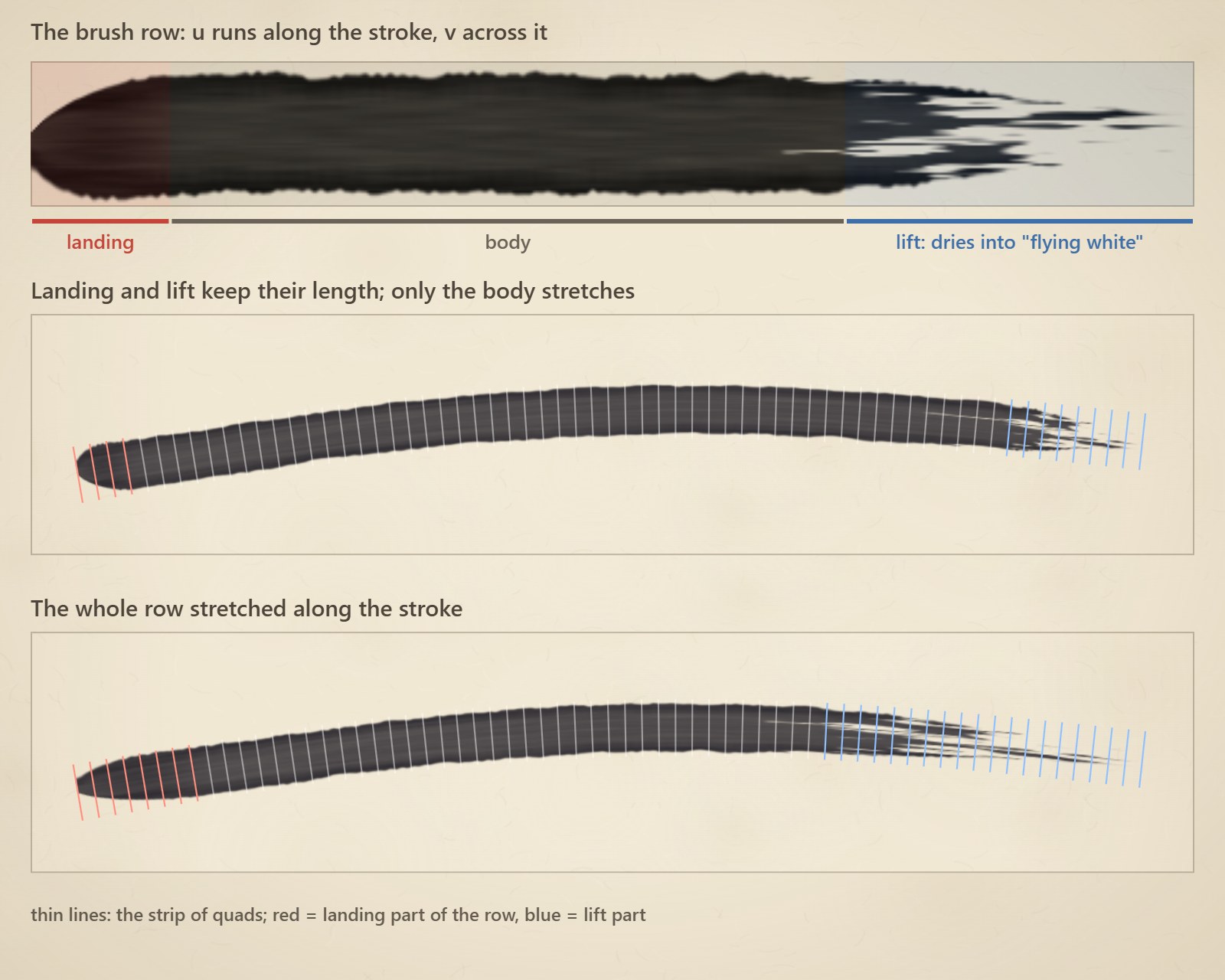
I draw every stroke as a ribbon: a strip of quads along the path, textured with a brush stroke. The texture is generated once by a small script, one row per brush, from a freshly loaded one to one that's nearly dry. Each row has a blunt, slightly slanted landing, a body of bristle streaks with ink pooled at the edges, and a lift that tapers and breaks up into streaks where the paper shows through (calligraphers call this flying white).
There's one catch. If you stretch the whole row over the stroke, a long stroke smears its landing into a long blob. So the landing and the lift keep a fixed length, about one and three stroke widths, and only the body stretches:
u: f32
switch {
case s < cap_len:             // landing: fixed length
    u = CAP_U * s / cap_len
case s > length - tail_len:   // lift: fixed length
    u = TAIL_U + (1 - TAIL_U) * (s - (length - tail_len)) / tail_len
case:                         // the body takes up the slack
    u = CAP_U + (TAIL_U - CAP_U) * (s - cap_len) / (length - cap_len - tail_len)
}
The brush moves like a hand, too: it starts quickly and slows down, and its front edge is a little soft. When the stroke is done it stays on the paper for a moment, then settles to a faint mark and dries away over a few seconds.
One trap here, because I fell into it. I draw the strokes into a transparent target and composite it later. With plain alpha blending the alpha channel gets multiplied by itself too, so an 85% black stroke ends up only 72% opaque and looks grey. Blending the alpha channel separately (just ONE, ONE_MINUS_SRC_ALPHA for it) keeps the ink as dark as it was drawn.
Showing the sprite where the brush has been
Now put the sprite back. It's drawn after the strokes, on top of them, so it hides every stroke it overlaps, and only the overshoot, the part of a stroke that ran off the outline, stays visible. This matters more than it sounds. My first attempts painted the brushwork inside the sprite's shader, clipped to the silhouette, and it never worked: strokes only look like strokes when they're allowed to run past the edge of the art. Everything I made that way looked like torn paper strips.
What's left is to let the sprite come up only where the brush has been. For that every pixel needs one number: when does the brush get here? I call it the reach map, and it's a small one-channel texture the size of the sprite's mask. Here's one (early is yellow, late is blue), and the sprite coming up through it:
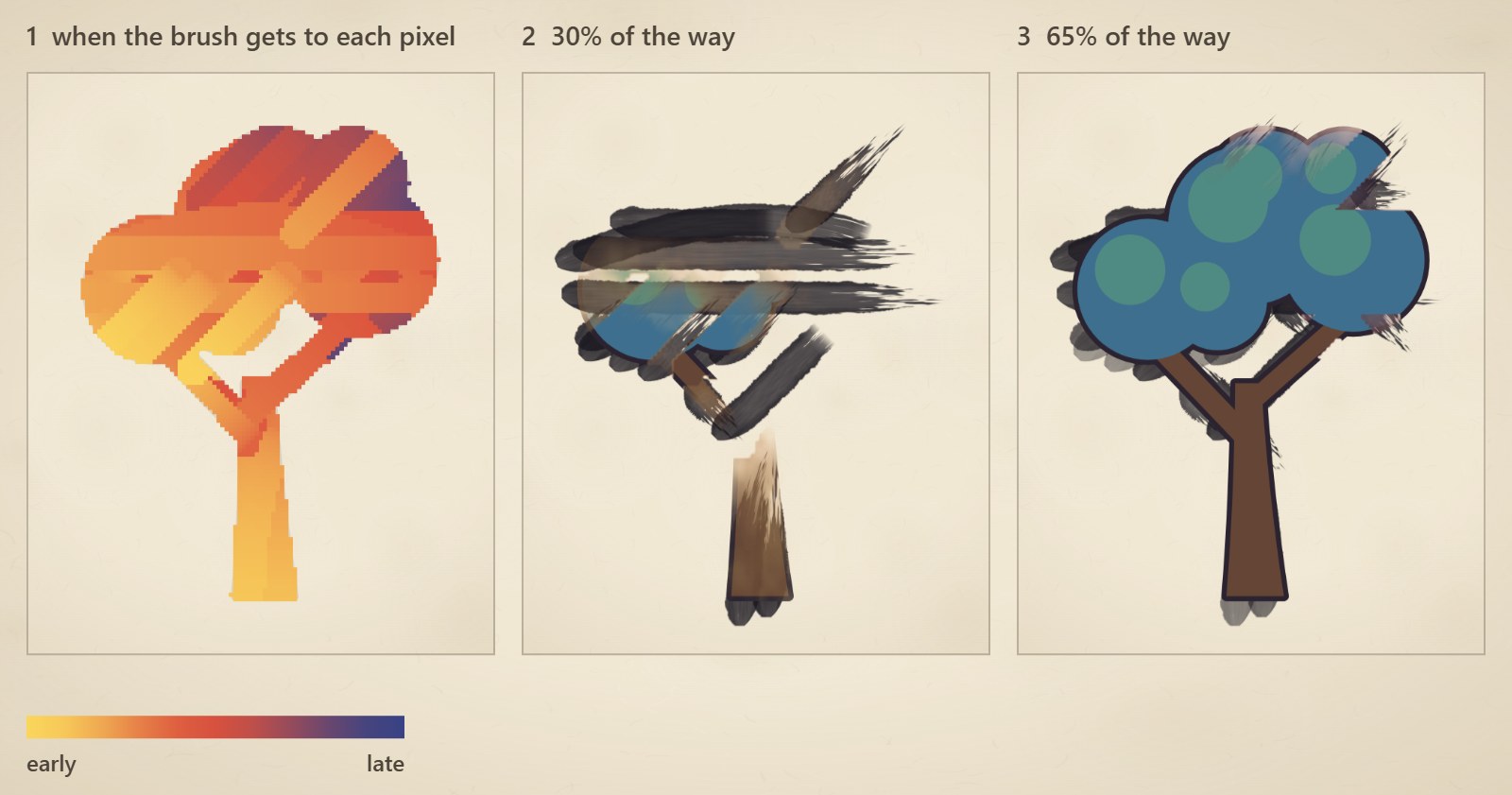
The shader that uses it is almost nothing. It compares the map with how far the drawing has got and fades the pixel in a moment later, with a bit of noise so the edge of the front isn't a clean line:
float bloom(vec2 mapUV) {
    float reached = texture(inkMap, mapUV).r;        // when the brush got here
    float front   = progress * 1.15;                 // how far the drawing has got
    float uneven  = (fbm(mapUV * 14.0 + seed) - 0.5) * 0.06;
    return smoothstep(0.0, 0.18, front - reached - 0.08 + uneven);
}

// in main(): if (bloom <= 0.0) discard; outColor.a *= bloom;
The numbers are picked so that everything has fully come up by the end of the drawing. That means the last frame is identical to the plain sprite, and switching back to the normal shader is invisible.
Where the map comes from is the rest of the post.
Splitting the sprite into parts
A painter doesn't scribble: a trunk gets vertical strokes, a canopy gets horizontal ones, a branch follows the branch. So the first thing I do is find out which way every part of the sprite runs. For each solid pixel I measure how long the solid run through it is in four directions (across, up and down, and the two diagonals) and take the longest one. Diagonals count for a little less, so a part only gets diagonal strokes if it really runs that way. Then each region is hatched along its own direction, with lines about one and a half stroke widths apart, and every run of solid pixels along such a line becomes one stroke.
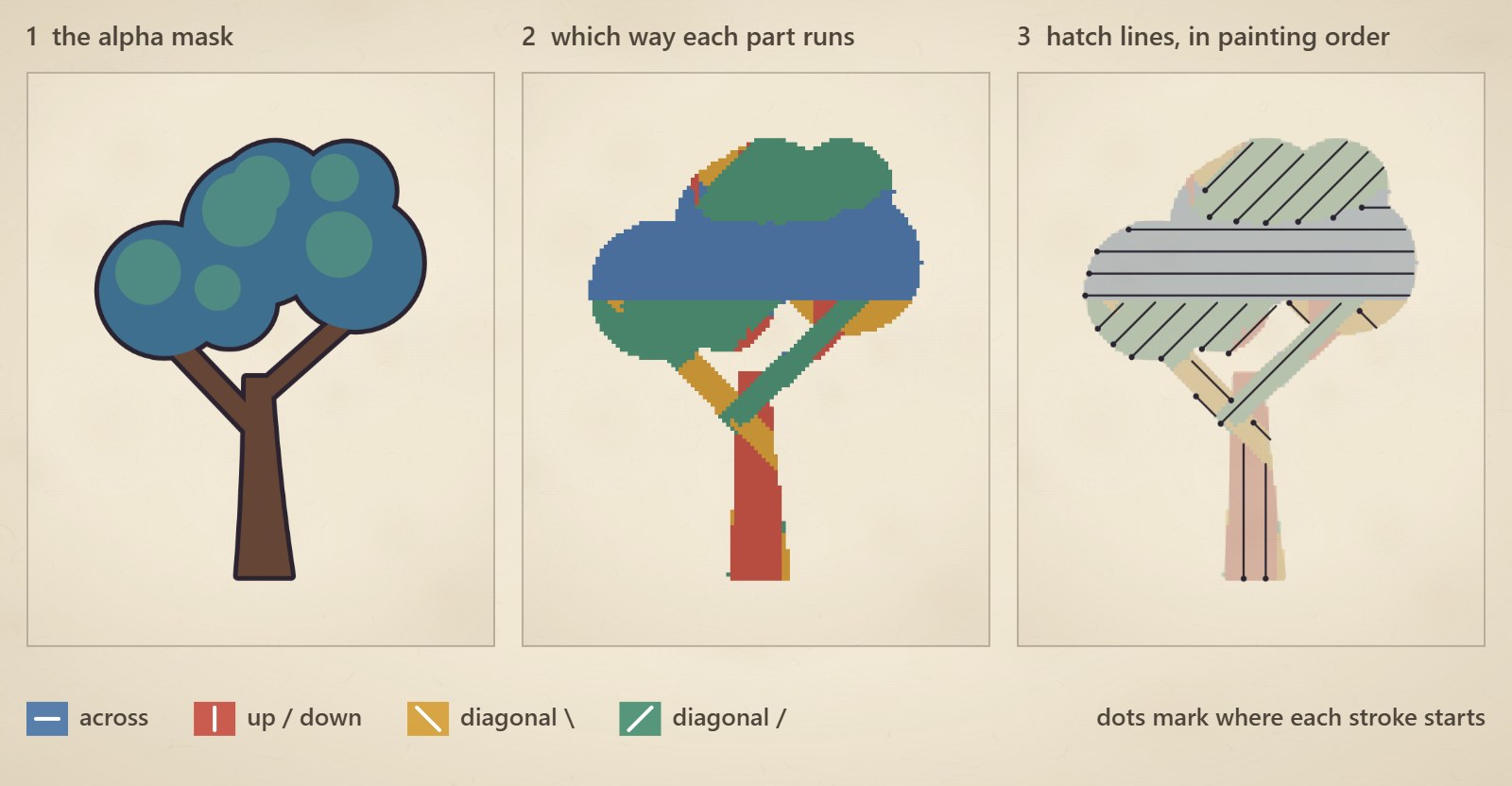
A few things make the strokes feel hand-made instead of computed. They're laid in the direction the painting travels (mostly from the bottom up, sometimes diagonally, rarely sideways), with a bit of shuffling, and two or three jump to the front, like a painter going for a small detail. Each stroke starts a little before its run and ends a little after it, so it runs off the outline onto the paper. And a few long ones are bent into a bow or an S, but only if the middle of the stroke stays on the art. My first version bowed a stroke clean off a thin part, and that part never got painted :)
The reach map
Once the strokes are planned, building the map is easy. Every pixel under a stroke takes the time of the earliest stroke that covers it. The brush slows down towards the end, so a pixel a fraction s along a stroke is reached at t0 + dur * (1 - sqrt(1 - s)). Pixels that no stroke touches take their time from the nearest pixel that one did, a little later for every step away (it's a simple distance sweep over the shape). The paper around the sprite copies its nearest art pixel, so filtering at the edge doesn't pull in garbage.
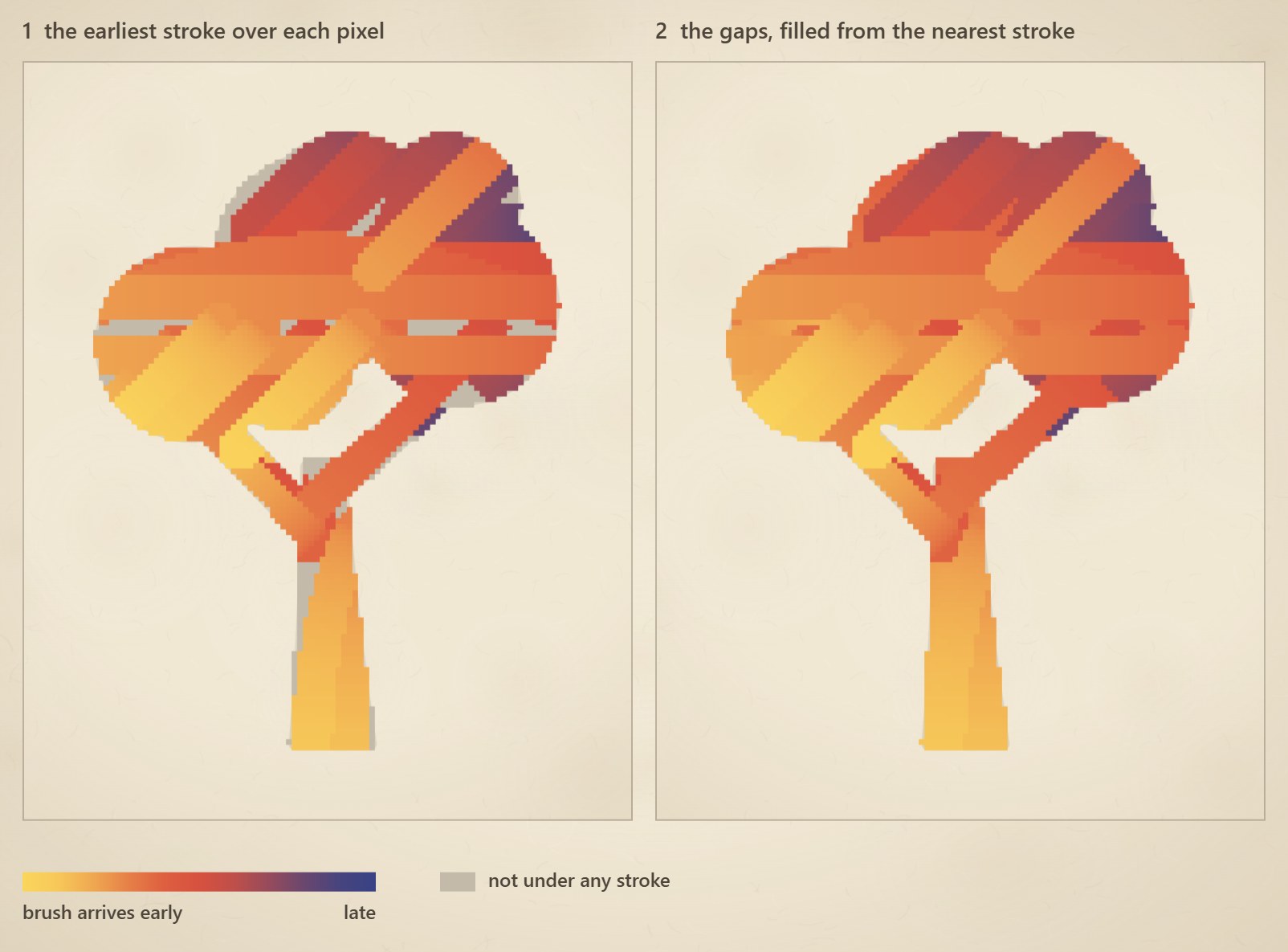
A mistake worth mentioning, since it's a quiet one: my first version of the gap fill let covered pixels get lowered too. The sweep then spread the earliest time through the whole shape, and the entire sprite bloomed in half a second. The fix is one condition: only pixels that no stroke covered take part.
Blobs
The last bit is what makes the drawing look wet. The reach map doubles as a source of places for ink to land: I keep a few dozen points on the sprite and in a thin band just outside it, and when the front of the drawing passes a point, it may drop a blob there. There are three kinds: a splat (a dark drop with a few smaller droplets and flicked streaks), a wet spot (a pale pool that's darker at the rim, because pigment gathers at the edge of a drying puddle) and a diluted blob (soft and light, no hard edge). Points on the sprite mostly give splats, points around it give wet spots, and limits per drawing stop a big sprite from drowning in ink. The points around the sprite are also nudged a little away from it, otherwise the blobs would hide under the picture.
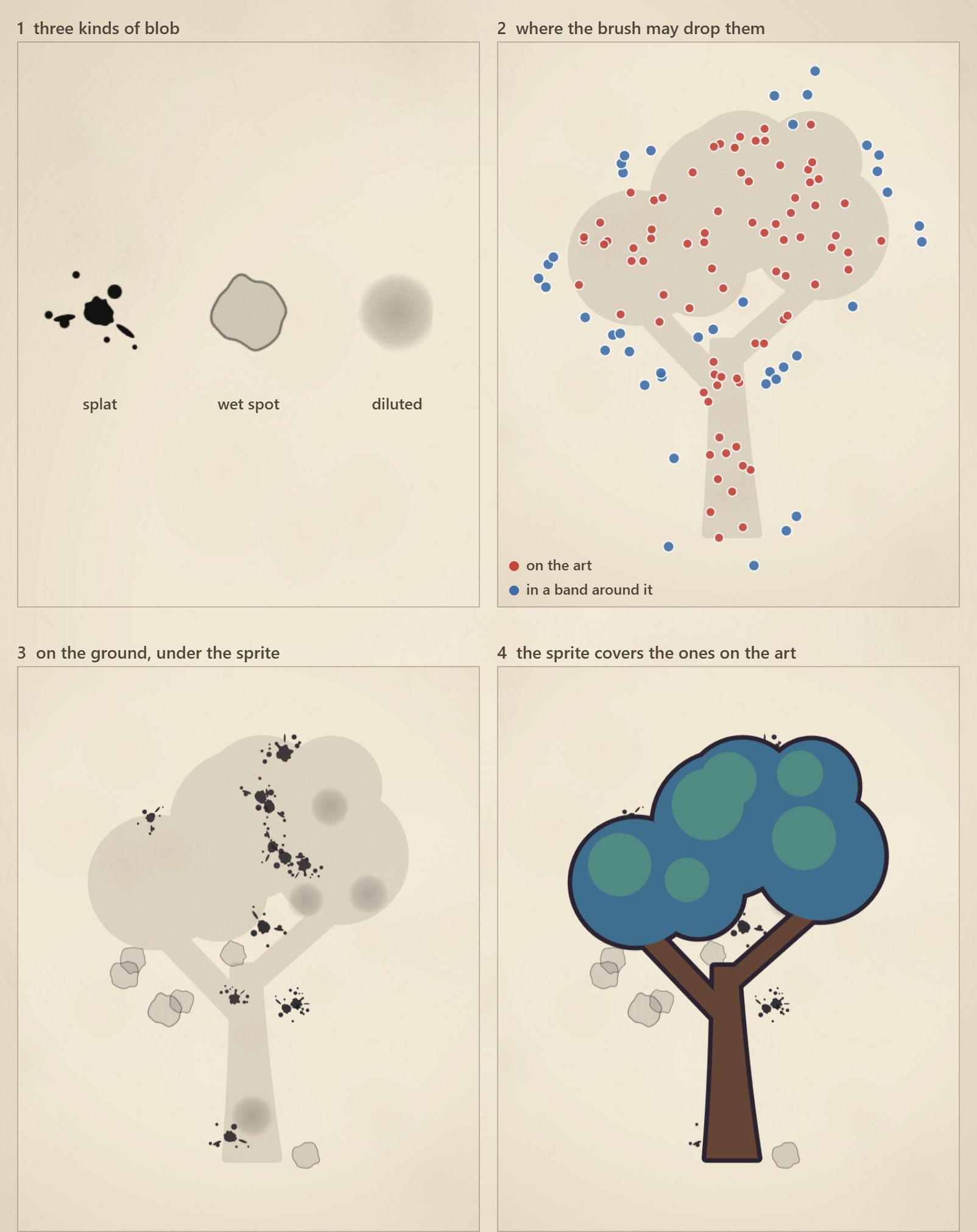
Blobs lie on the ground layer, under the sprite, so the sprite covers the ones that landed on it and leaves the ones around it. The final order is paper, strokes, blobs, sprite.
Wrapping up
The whole thing is cheaper than it looks. Planning happens once per drawing on a small mask (128 pixels on the longer side), and every frame is a few dozen ribbons, a handful of blobs and one extra texture lookup in the sprite's shader. If you want to play with it, the easy knobs are stroke width, how many strokes bend, how much diagonals are discounted and how many brushes are in the atlas. And playing the whole thing backwards, strokes included, gives a surprisingly nice way to erase a sprite, but that's a story for another post.